
3rr Game Deposit Guide: Instant JazzCash & Easypaisa
Funding your in-app wallet on 3rr Game is straightforward, fast, and fully localized for Pakistani users. You do not need international credit cards or complex banking steps. With integrated support for JazzCash, Easypaisa, and Local Bank Transfers, you can add funds securely within minutes.

What Is 3RR Game Deposit?
The 3RR Game deposit option refers to adding funds to an account if the platform provides this service. Users should check whether deposits are currently supported and review all applicable conditions before proceeding. Do not assume that every payment method available on another gaming website is also supported by 3RR Game.
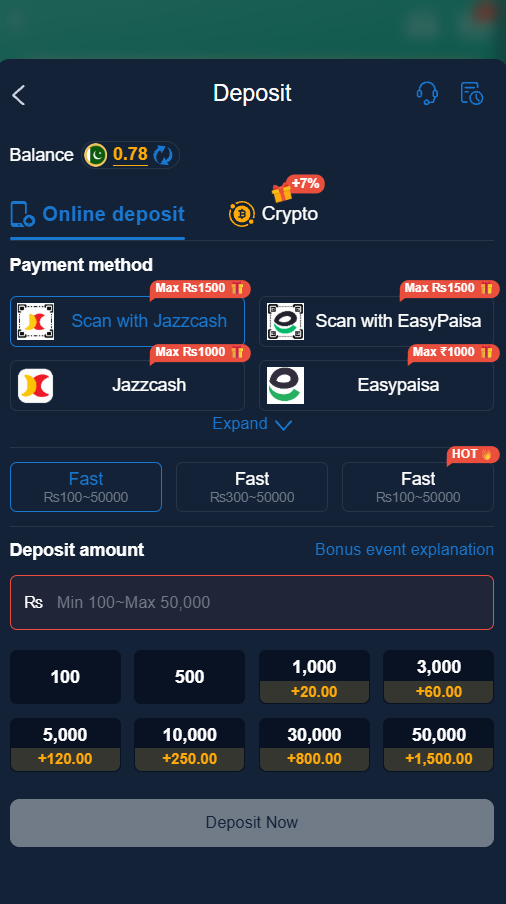
Supported Payment Gateways
- Easypaisa Wallet
- JazzCash Wallet
- Local Bank Transfer (Meezan, HBL, Allied Bank, etc.)
- SadaPay / Nayapay
How to Deposit Funds Step-by-Step
- Open the 3rr Game Apk and log into your account.
- Tap the Wallet / Deposit icon on the top dashboard menu.
- Select your preferred payment channel (e.g., JazzCash or Easypaisa).
- Select or type your desired deposit amount (Minimum deposit starts at PKR 100).
- The screen will display an official receiving account number and title.
- Open your mobile wallet app (JazzCash/Easypaisa), transfer the specified amount to the provided details, and save the 12-digit Transaction ID (TID).
- Return to the 3rr Game app, paste the TID into the confirmation field, and tap Submit.
Important Deposit Tips
- Double-check the receiving account title before sending funds.
- Keep a screenshot of your payment receipt until the balance updates in your wallet.
- Most deposits process within 1 to 5 minutes. If your balance delays, contact 24/7 Live Support with your TID.
What to Do If a Deposit Is Not Showing
Sometimes a payment may not appear in an account immediately. Possible reasons include a network problem, incorrect transaction details or a delay in payment confirmation.
If this happens, consider these steps:
- Check your payment confirmation.
- Review the transaction details.
- Check the account balance again.
- Keep your transaction reference if one is provided.
- Contact the official support channel if available.
Do not make another payment simply because the first transaction has not appeared. First confirm its status with the relevant payment provider or official platform support.
Final Words
This 3RR Game deposit guide explains the general steps for checking payment options and understanding account funding. Actual deposit methods, limits and processing conditions must be confirmed through the platform’s current official information.